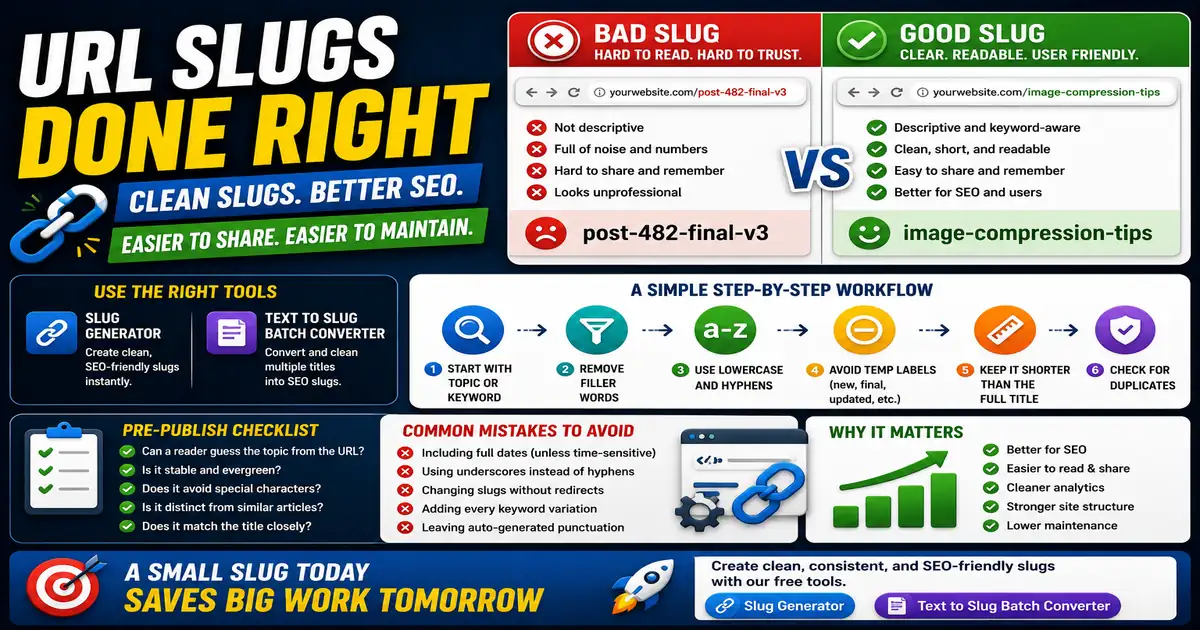
A URL slug is a small detail with a large maintenance impact. It appears in search results, browser address bars, social shares, analytics reports, and internal links. This matters for bloggers, SEO beginners, and website owners organizing a growing content library because small publishing decisions compound across a site over time.
The Core Idea
The core idea is simple: clean slugs use short, readable words that describe the page without dates, clutter, or unnecessary stop words. When this idea is applied consistently, the page feels more intentional and the publishing process becomes less dependent on memory or guesswork.
Why It Matters in Practice
A slug like post-482-final-v3 tells readers nothing. A slug like image-compression-tips is easier to scan, easier to share, and easier to recognize later in analytics.
This is where local tools are useful. They give you a fast way to check one detail without opening a large application or sending your content through an external service. For a focused hands-on check, use the Slug Generator and Text to Slug Batch Converter while reviewing the page.
A Practical Step-by-Step Workflow
Slug decisions are easiest before a page is published, because changing them later may require redirects and link updates.
- Start with the article topic or primary keyword.
- Remove filler words that do not help recognition.
- Use lowercase letters and hyphens.
- Avoid temporary labels such as new, final, or updated.
- Keep the slug shorter than the full title when possible.
- Check that it does not duplicate another page.
This workflow can be added to a publishing checklist, a content brief, or a personal editing routine. The exact order may change from one project to another, but the habit of checking before publishing is what protects quality over time.
Practical Example
If a content team plans ten articles from a keyword list, batch slug cleanup can prevent duplicates before pages are created. It also helps editors spot titles that are too similar to deserve separate posts.
Common Mistakes to Avoid
When optimizing this element in your drafts, review the final output carefully to avoid errors that compromise readability and search presentation. Watch for these specific mistakes:
- Including full dates when the page is evergreen.
- Using underscores instead of hyphens.
- Changing slugs after publishing without a redirect plan.
- Adding every keyword variation.
- Letting auto-generated slugs keep punctuation or symbols.
Pre-Publish Checklist
Review this focused checklist before publishing your work to ensure all details are correct:
- Verify the slug is 100% lowercase.
- Use hyphens as separators; verify no underscores are used.
- Strip out all stop words and special characters.
- Ensure slug is short, descriptive, and matches page topic.
A Small Workflow Tip
Create slug rules before the content calendar gets busy. A simple rule such as lowercase words, hyphens, no dates for evergreen posts, and no temporary labels prevents many future cleanup tasks. When several people publish content, these rules also reduce accidental duplicates and make analytics reports easier to read because every URL follows the same pattern.