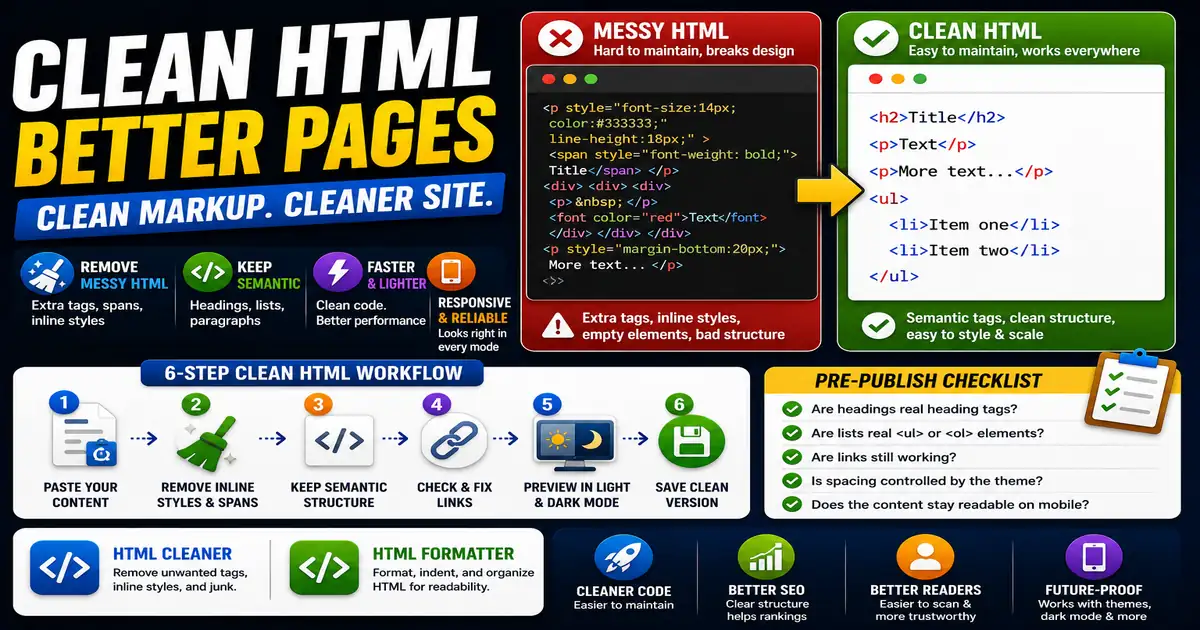
Content often passes through editors, page builders, email tools, and CMS fields before it reaches a website. Along the way, messy HTML can collect extra spans, inline styles, empty tags, and broken formatting. This matters for blog editors, website owners, and anyone pasting content between tools because small publishing decisions compound across a site over time.
The Core Idea
The core idea is simple: clean HTML keeps the structure of content clear without unnecessary markup that makes pages harder to maintain. When this idea is applied consistently, the page feels more intentional and the publishing process becomes less dependent on memory or guesswork.
Why It Matters in Practice
A pasted article might look fine visually but contain dozens of inline font styles. Later, dark mode or responsive typography may behave unpredictably because the content is fighting the site stylesheet.
This is where local tools are useful. They give you a fast way to check one detail without opening a large application or sending your content through an external service. For a focused hands-on check, use the HTML Cleaner and HTML Formatter while reviewing the page.
A Practical Step-by-Step Workflow
Treat HTML cleanup as part of the publishing checklist, especially when content comes from outside the CMS.
- Paste the draft into a plain editor or cleaner.
- Remove inline styles that do not belong in article content.
- Keep semantic tags such as headings, paragraphs, and lists.
- Check links after cleaning.
- Preview the page in light and dark mode.
- Save a clean version for future edits.
This workflow can be added to a publishing checklist, a content brief, or a personal editing routine. The exact order may change from one project to another, but the habit of checking before publishing is what protects quality over time.
Practical Example
A clean article body should use headings for sections, paragraphs for ideas, and lists for steps. It should not carry a long trail of copied span styles from a document editor.
Common Mistakes to Avoid
When optimizing this element in your drafts, review the final output carefully to avoid errors that compromise readability and search presentation. Watch for these specific mistakes:
- Keeping copied word processor markup.
- Using headings only for visual size.
- Leaving empty paragraphs for spacing.
- Removing list structure and replacing it with line breaks.
- Trusting visual preview without checking mobile.
Pre-Publish Checklist
Review this focused checklist before publishing your work to ensure all details are correct:
- Remove inline styles and inline JavaScript from markup.
- Ensure HTML tags are closed in the correct order.
- Use semantic elements like article, section, and nav.
- Strip out empty tags or copy-paste markup errors.
A Small Workflow Tip
If your team often copies content from documents, keep a clean-content checkpoint in the publishing routine. It can be as simple as checking headings, lists, links, and inline styles before the final preview. This habit prevents small pasted formatting problems from turning into site-wide design inconsistencies later, especially when themes or dark mode styles change.