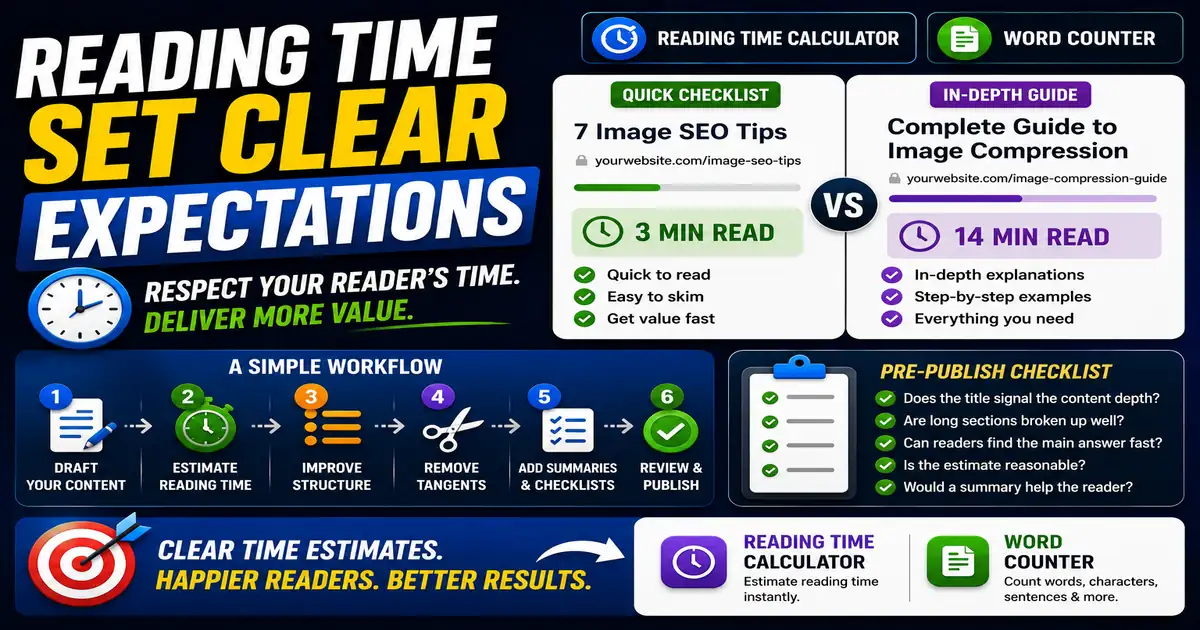
Reading time is a small interface detail that can make a blog feel more respectful. It tells readers what kind of commitment they are making before they start. This matters for blog owners, editors, and content teams improving reader experience because small publishing decisions compound across a site over time.
The Core Idea
The core idea is simple: estimated reading time helps people decide whether to skim, save, or fully read a page. When this idea is applied consistently, the page feels more intentional and the publishing process becomes less dependent on memory or guesswork.
Why It Matters in Practice
A busy marketer may open a 3-minute checklist immediately but save a 14-minute guide for later. Both pages can be useful when expectations are clear.
This is where local tools are useful. They give you a fast way to check one detail without opening a large application or sending your content through an external service. For a focused hands-on check, use the Reading Time Calculator and Word Counter while reviewing the page.
A Practical Step-by-Step Workflow
Use reading time as a planning and editing signal, especially when an article feels unfocused.
- Estimate reading time after drafting.
- Compare the estimate with the depth promised by the title.
- Break long articles into scannable sections.
- Move tangents into separate posts when needed.
- Add summaries or checklists for longer guides.
- Review whether the page still answers the main question quickly.
This workflow can be added to a publishing checklist, a content brief, or a personal editing routine. The exact order may change from one project to another, but the habit of checking before publishing is what protects quality over time.
Practical Example
If a reader clicks a quick checklist and lands on a long essay, the mismatch creates friction. A visible reading estimate and clear headings help readers decide how to engage with the content.
Common Mistakes to Avoid
When optimizing this element in your drafts, review the final output carefully to avoid errors that compromise readability and search presentation. Watch for these specific mistakes:
- Hiding a long commitment behind a short-sounding title.
- Cutting useful detail only to reduce the estimate.
- Ignoring mobile readers who skim sections first.
- Using reading time without improving structure.
- Treating a reading estimate as exact.
Pre-Publish Checklist
Review this focused checklist before publishing your work to ensure all details are correct:
- Calculate reading time using a standard 200 WPM rate.
- Position a reading time indicator near the top of the post.
- Use descriptive H2 headers to allow quick scanning.
- Format longer articles to keep session duration high.
A Small Workflow Tip
Use reading time as an expectation-setting tool, not a badge. If an article takes twelve minutes to read, make the structure worth that commitment with a strong table of contents, descriptive headings, and practical summaries. If a post is only three minutes, keep the promise focused and avoid adding filler just to make it look more substantial.