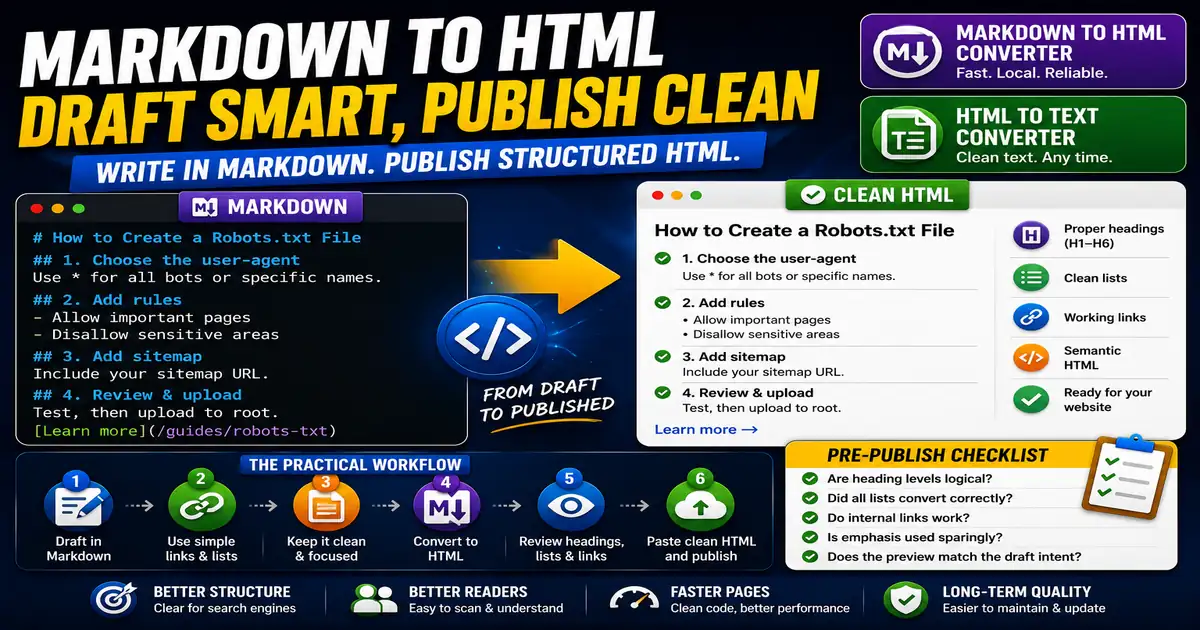
Markdown is popular because it keeps writing focused. You can create headings, lists, links, and emphasis without dealing with complex editor controls. This matters for bloggers, technical writers, and editors who want a cleaner publishing process because small publishing decisions compound across a site over time.
The Core Idea
The core idea is simple: Markdown is useful for drafting, but clean HTML is usually what the website needs at publication time. When this idea is applied consistently, the page feels more intentional and the publishing process becomes less dependent on memory or guesswork.
Why It Matters in Practice
A writer can draft an outline with heading markers, add bullets for steps, and convert the finished copy to HTML before pasting it into a CMS field.
This is where local tools are useful. They give you a fast way to check one detail without opening a large application or sending your content through an external service. For a focused hands-on check, use the Markdown to HTML Converter and HTML to Text Converter while reviewing the page.
A Practical Step-by-Step Workflow
The goal is not to make publishing technical. The goal is to reduce formatting surprises.
- Draft the article in Markdown using clear heading levels.
- Use simple link syntax for internal references.
- Avoid custom styling inside the draft.
- Convert Markdown to HTML when the copy is ready.
- Review the generated headings and lists.
- Paste the clean HTML into the publishing field.
This workflow can be added to a publishing checklist, a content brief, or a personal editing routine. The exact order may change from one project to another, but the habit of checking before publishing is what protects quality over time.
Practical Example
A blogger can write a post outline in Markdown, convert it to HTML, then run a quick heading review before publishing. That keeps writing comfortable while still producing structured page content.
Common Mistakes to Avoid
When optimizing this element in your drafts, review the final output carefully to avoid errors that compromise readability and search presentation. Watch for these specific mistakes:
- Mixing too much raw HTML into the Markdown draft.
- Skipping heading hierarchy checks.
- Forgetting to preview links after conversion.
- Using Markdown tables when the site does not style tables well.
- Treating converted HTML as final without review.
Pre-Publish Checklist
Review this focused checklist before publishing your work to ensure all details are correct:
- Draft content in clean, readable Markdown syntax.
- Convert Markdown headers, links, and bold tags to HTML.
- Check that generated HTML tags are clean and unstyled.
- Verify external links have secure rel attributes.
A Small Workflow Tip
Keep Markdown drafts and published HTML in separate mental buckets. Markdown is excellent for thinking and drafting, while HTML is the delivery format your site must render cleanly. When something looks wrong after conversion, fix the source draft when possible, then convert again. That keeps future edits cleaner than patching the final HTML repeatedly.