Duplicate lines sneak into keyword research, URL exports, redirect lists, outreach sheets, and content briefs. They waste review time and can lead to repeated work. This matters for SEO researchers, content planners, and website managers cleaning lists because small publishing decisions compound across a site over time.
The Core Idea
The core idea is simple: removing duplicates makes a list easier to trust, sort, count, and use in the next step of a workflow. When this idea is applied consistently, the page feels more intentional and the publishing process becomes less dependent on memory or guesswork.
Why It Matters in Practice
A keyword list from several tools may contain the same phrase with small spacing differences. Cleaning the list before grouping topics prevents inflated totals and repeated articles.
This is where local tools are useful. They give you a fast way to check one detail without opening a large application or sending your content through an external service. For a focused hands-on check, use the Duplicate Line Remover and Remove Extra Spaces while reviewing the page.
A Practical Step-by-Step Workflow
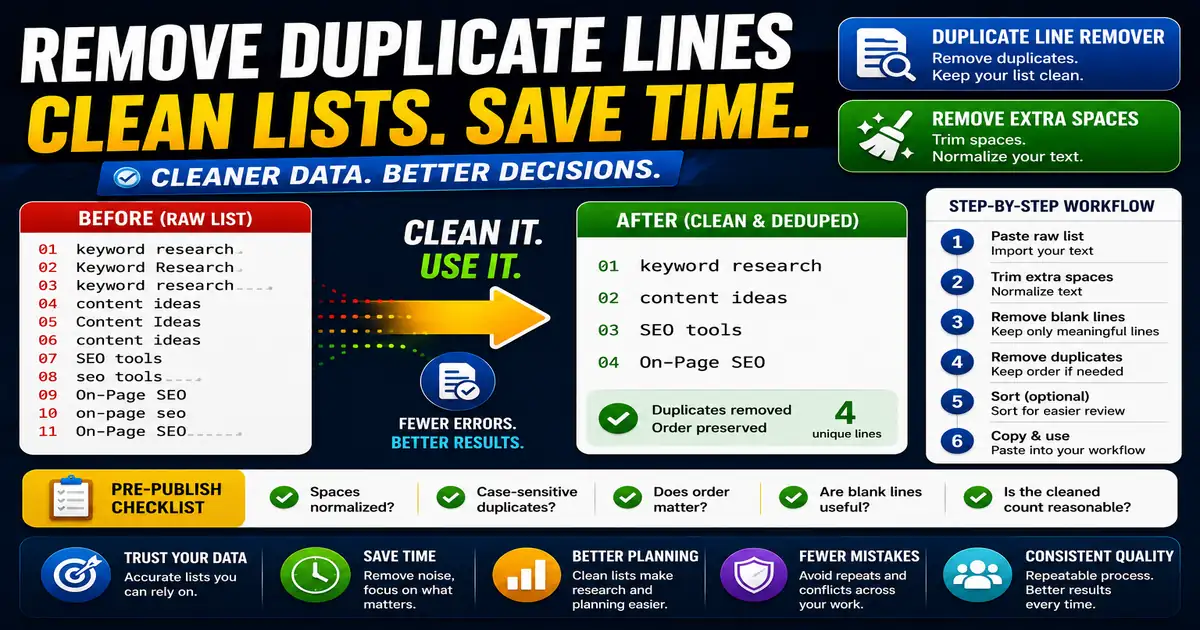
Duplicate cleanup works best after basic formatting cleanup, because extra spaces can make identical lines appear different.
- Paste the raw list into a cleaner.
- Trim extra spaces from each line.
- Remove blank lines if they are not meaningful.
- Remove duplicates while keeping the order when needed.
- Sort the remaining list if comparison is easier.
- Copy the final list into your planning sheet.
This workflow can be added to a publishing checklist, a content brief, or a personal editing routine. The exact order may change from one project to another, but the habit of checking before publishing is what protects quality over time.
Practical Example
A redirect audit might contain the same old URL several times because data came from multiple exports. Removing duplicates makes the review faster and lowers the chance of conflicting notes.
Common Mistakes to Avoid
When optimizing this element in your drafts, review the final output carefully to avoid errors that compromise readability and search presentation. Watch for these specific mistakes:
- Removing duplicates before trimming spaces.
- Ignoring case differences when they do not matter.
- Deleting blank lines that separate groups without saving a backup.
- Assuming every duplicate is useless in data where counts matter.
- Forgetting to review the cleaned list.
Pre-Publish Checklist
Review this focused checklist before publishing your work to ensure all details are correct:
- Sort keyword list alphabetically to reveal adjacent duplicates.
- Remove exact matches while keeping unique search terms.
- Clean up extra blank lines or trailing spaces from lists.
- Verify sorted keyword count is correct before mapping campaigns.
A Small Workflow Tip
When cleaning research lists, preserve the raw input until the final list is approved. Duplicate removal is powerful, but sometimes repeated lines reveal frequency or demand. For keyword research, duplicates may show overlap across sources; for redirect work, they may reveal repeated errors. Clean the working copy while keeping the original available for context.