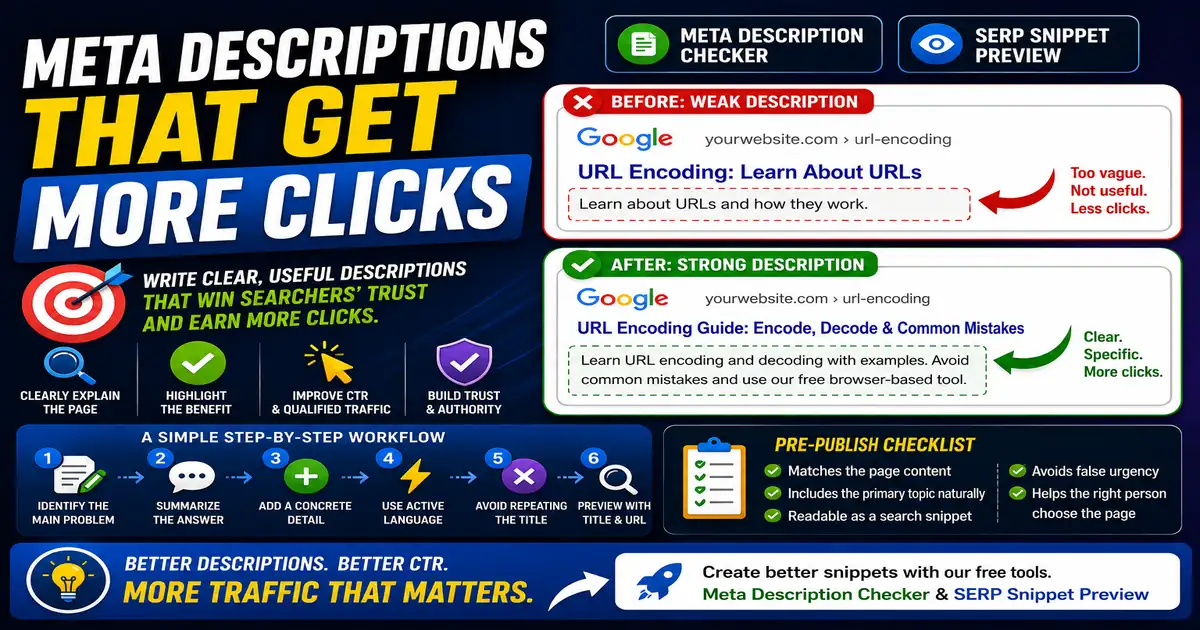
A meta description is not a direct ranking lever in the simple sense people often imagine, but it can influence how searchers understand and choose your result. A clear description can turn a good ranking into more qualified visits. This matters for site owners, marketers, and writers who want better search snippets because small publishing decisions compound across a site over time.
The Core Idea
The core idea is simple: a good description summarizes the page, names the benefit, and makes the next step feel obvious. When this idea is applied consistently, the page feels more intentional and the publishing process becomes less dependent on memory or guesswork.
Why It Matters in Practice
For an article about URL encoding, Learn about URLs is too broad. A stronger description says that the page explains encoding, decoding, common mistakes, and when to use a browser-based tool.
This is where local tools are useful. They give you a fast way to check one detail without opening a large application or sending your content through an external service. For a focused hands-on check, use the Meta Description Checker and SERP Snippet Preview while reviewing the page.
A Practical Step-by-Step Workflow
The best descriptions are written after the page is drafted, because they should reflect the actual content rather than a planned outline.
- Identify the main problem the page solves.
- Write one sentence that summarizes the answer.
- Add one concrete detail from the page.
- Use active language without sounding promotional.
- Avoid repeating the title word for word.
- Preview the description with the title and URL together.
This workflow can be added to a publishing checklist, a content brief, or a personal editing routine. The exact order may change from one project to another, but the habit of checking before publishing is what protects quality over time.
Practical Example
A meta description for a JSON formatting article can mention validation, indentation, and minifying because those are the tasks the reader expects. That makes the snippet specific without turning it into a keyword list.
Common Mistakes to Avoid
When optimizing this element in your drafts, review the final output carefully to avoid errors that compromise readability and search presentation. Watch for these specific mistakes:
- Leaving descriptions empty on important pages.
- Copying the first sentence from the article without editing it.
- Writing descriptions that are too generic to earn a click.
- Adding keywords in a list instead of a readable sentence.
- Using the same description across many pages.
Pre-Publish Checklist
Review this focused checklist before publishing your work to ensure all details are correct:
- Keep length between 120 and 155 characters.
- Include a clear call to action (e.g., 'Read our guide').
- Match the exact search intent of the primary keyword.
- Ensure the description does not contain duplicate text.
A Small Workflow Tip
Save a few before-and-after descriptions for important pages. Over time, this becomes a practical reference for your own voice: how much detail feels helpful, what kind of call to action sounds natural, and which descriptions set accurate expectations. This is especially useful for teams, because new writers can learn from examples instead of guessing what a good snippet should sound like.