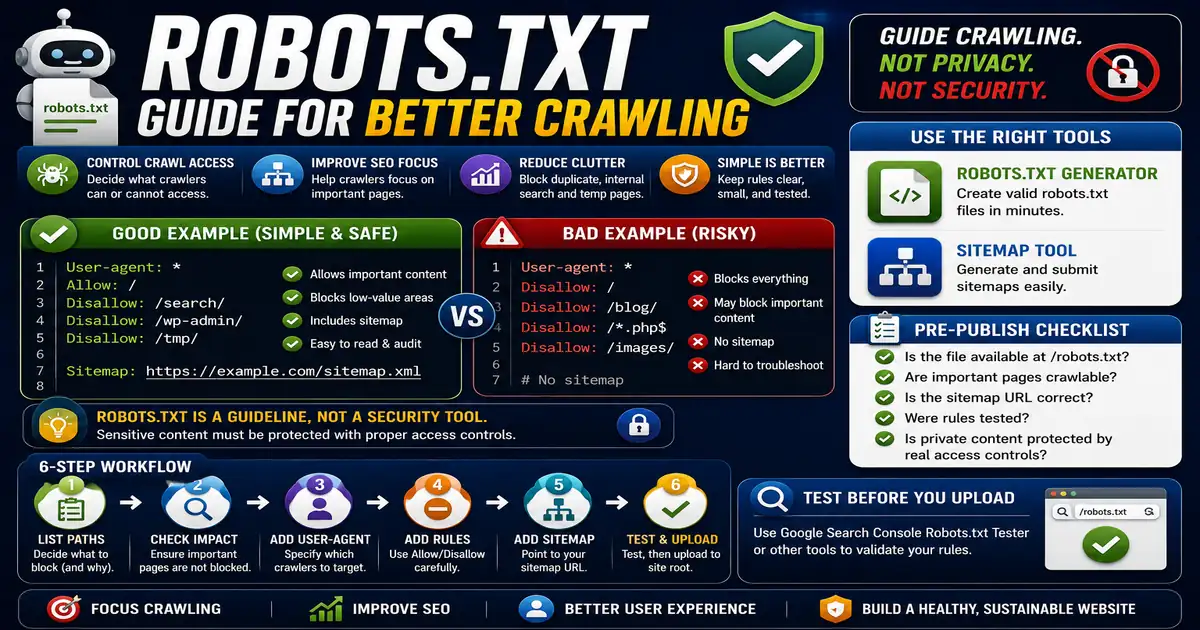
Robots.txt is a small text file placed at the root of a website. It gives instructions to crawlers about which areas they may or may not crawl. This matters for website owners, bloggers, and SEO beginners managing crawl access because small publishing decisions compound across a site over time.
The Core Idea
The core idea is simple: robots.txt guides crawling, but it is not a privacy or security mechanism. When this idea is applied consistently, the page feels more intentional and the publishing process becomes less dependent on memory or guesswork.
Why It Matters in Practice
A simple site may allow all crawlers and include a sitemap line. A larger site may disallow internal search result pages, temporary folders, or duplicate paths.
This is where local tools are useful. They give you a fast way to check one detail without opening a large application or sending your content through an external service. For a focused hands-on check, use the Robots.txt Generator and Sitemap while reviewing the page.
A Practical Step-by-Step Workflow
Start simple. A complicated robots.txt file can create bigger problems than it solves.
- List the paths you want crawlers to avoid.
- Confirm those paths do not contain pages that need to rank.
- Add a User-agent line.
- Add Disallow or Allow rules carefully.
- Include the sitemap URL when available.
- Test the file before uploading it to the site root.
This workflow can be added to a publishing checklist, a content brief, or a personal editing routine. The exact order may change from one project to another, but the habit of checking before publishing is what protects quality over time.
Practical Example
A blog might allow all public articles, disallow an internal search results path, and include a sitemap location. That simple file is easier to audit than a copied rule set from another website.
Common Mistakes to Avoid
When optimizing this element in your drafts, review the final output carefully to avoid errors that compromise readability and search presentation. Watch for these specific mistakes:
- Blocking important pages by accident.
- Using robots.txt to hide private information.
- Forgetting the sitemap line.
- Copying rules from another site without understanding them.
- Using wildcards incorrectly.
Pre-Publish Checklist
Review this focused checklist before publishing your work to ensure all details are correct:
- Specify allowed and disallowed directory paths clearly.
- Point search engines to the absolute XML sitemap URL.
- Ensure you don't block critical resource assets or scripts.
- Test robots.txt directives using crawler console tools.
A Small Workflow Tip
Keep robots.txt changes small and documented. If a rule is added to block a folder, write down why it exists and when it should be reviewed. Months later, that note can prevent confusion when a new page is placed in the same path and does not appear in search as expected.
After uploading the file, check it from the public URL rather than only from your editor. The live file is what crawlers see, and server rules or deployment paths can sometimes produce a different result than expected.