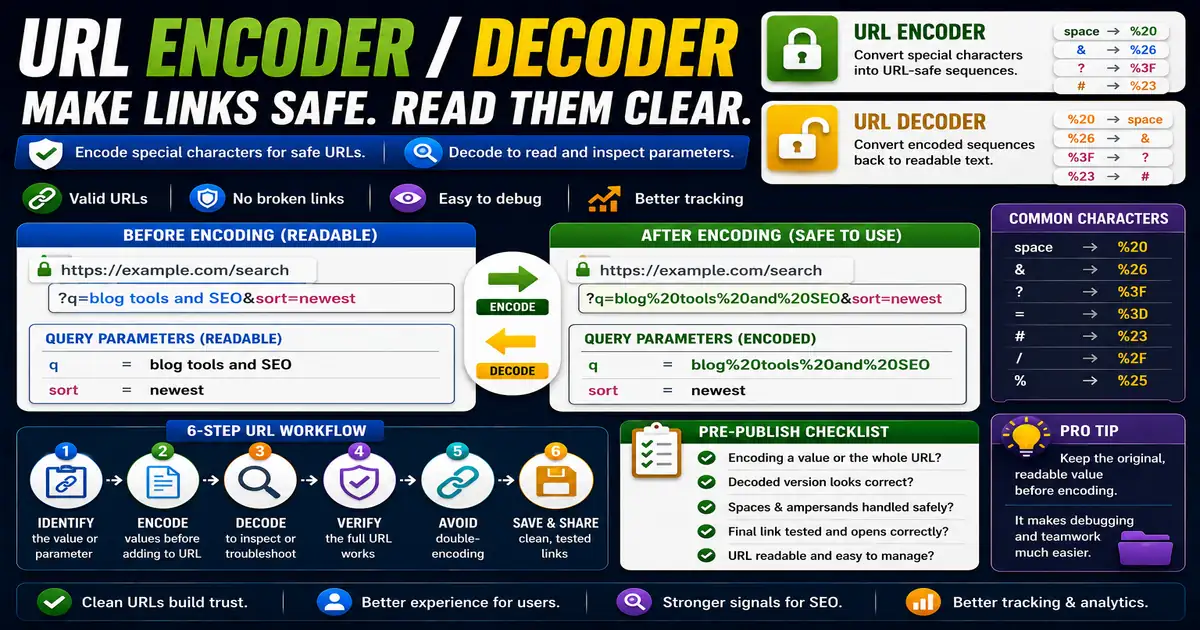
URLs have rules. Spaces, symbols, and non-standard characters can create confusion when they appear inside a link, especially in query strings or tracking links. This matters for bloggers, marketers, and site owners who edit links and campaign URLs because small publishing decisions compound across a site over time.
The Core Idea
The core idea is simple: encoding converts special characters into URL-safe sequences, while decoding turns them back into readable text. When this idea is applied consistently, the page feels more intentional and the publishing process becomes less dependent on memory or guesswork.
Why It Matters in Practice
A search query like blog tools and SEO may become a URL with percent-encoded spaces and symbols. Decoding helps you inspect what the link really contains.
This is where local tools are useful. They give you a fast way to check one detail without opening a large application or sending your content through an external service. For a focused hands-on check, use the URL Encoder / Decoder and Query String Parser while reviewing the page.
A Practical Step-by-Step Workflow
Encoding and decoding are most useful when building, checking, or troubleshooting links.
- Paste the text or URL component into a local encoder.
- Encode values before placing them in query parameters.
- Decode suspicious or unreadable parameters before reviewing them.
- Check that the full URL still opens correctly.
- Avoid double-encoding the same value.
- Save clean campaign links after testing.
This workflow can be added to a publishing checklist, a content brief, or a personal editing routine. The exact order may change from one project to another, but the habit of checking before publishing is what protects quality over time.
Practical Example
A campaign link with a topic parameter should encode spaces safely so the full URL remains valid. When reviewing the link later, decoding the parameter makes the original topic readable again.
Common Mistakes to Avoid
When optimizing this element in your drafts, review the final output carefully to avoid errors that compromise readability and search presentation. Watch for these specific mistakes:
- Encoding an entire URL when only one parameter value needs encoding.
- Double-encoding percent signs.
- Decoding links without checking the destination.
- Assuming every strange character is unsafe.
- Sharing untested encoded URLs.
Pre-Publish Checklist
Review this focused checklist before publishing your work to ensure all details are correct:
- Encode special characters (like spaces, tags) in URLs.
- Verify encoded strings use percent encoding format.
- Decode incoming referral URLs to read parameters cleanly.
- Ensure URL paths remain standard, secure, and clean.
A Small Workflow Tip
Keep one clean copy of the original value before encoding it. This makes troubleshooting much easier when a link breaks or a parameter looks strange. If the encoded version is shared across email, ads, or analytics notes, the original readable value helps the team confirm what the link was meant to communicate.