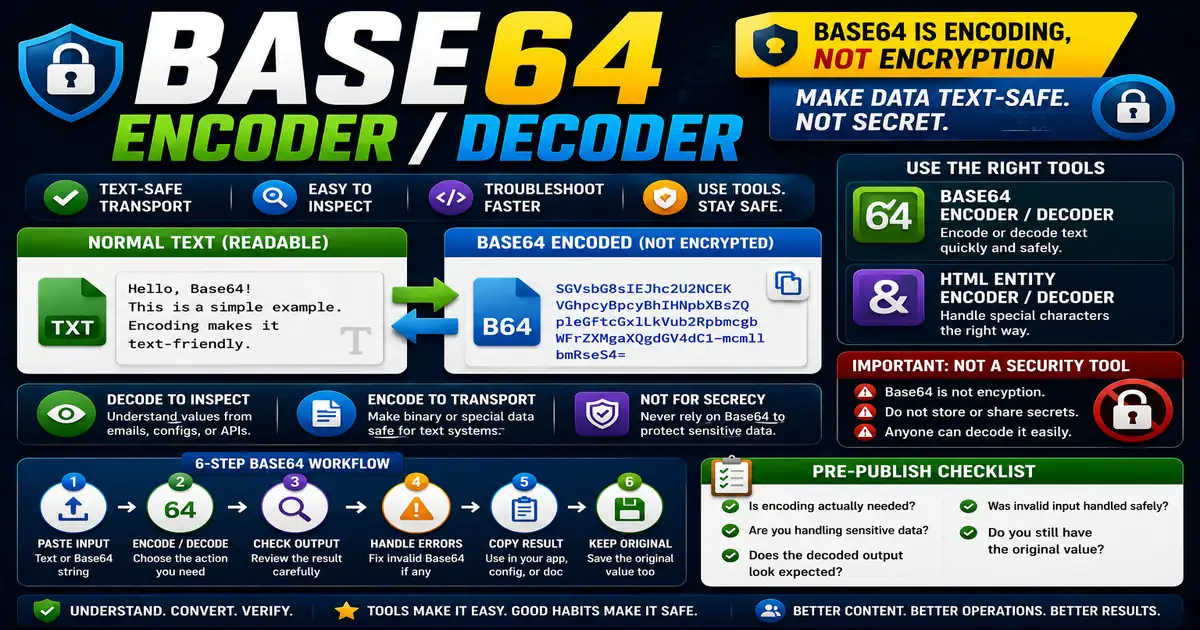
Base64 looks mysterious at first because encoded text can appear like a random mix of letters, numbers, plus signs, and slashes. In reality, it is a way to represent data as plain text. This matters for non-developers, content managers, and website owners who encounter encoded strings because small publishing decisions compound across a site over time.
The Core Idea
The core idea is simple: Base64 is encoding, not encryption, so it makes data transport-friendly but not secret. When this idea is applied consistently, the page feels more intentional and the publishing process becomes less dependent on memory or guesswork.
Why It Matters in Practice
You may see Base64 inside email source, data URLs, configuration values, or developer documentation. Decoding helps you inspect text values, but it should not be treated as a security tool.
This is where local tools are useful. They give you a fast way to check one detail without opening a large application or sending your content through an external service. For a focused hands-on check, use the Base64 Encoder / Decoder and HTML Entity Encoder / Decoder while reviewing the page.
A Practical Step-by-Step Workflow
Use Base64 tools for inspection, conversion, and troubleshooting, not for hiding sensitive data.
- Paste normal text into an encoder when a text-safe representation is needed.
- Paste encoded text into a decoder when you need to inspect it.
- Check error messages if the input is not valid Base64.
- Avoid decoding data from untrusted sources into executable contexts.
- Do not store secrets just because they are encoded.
- Keep original text if you need to edit it later.
This workflow can be added to a publishing checklist, a content brief, or a personal editing routine. The exact order may change from one project to another, but the habit of checking before publishing is what protects quality over time.
Practical Example
A configuration guide may show a Base64 string because the system expects text-safe data. Decoding can help confirm the value, but it does not make the content private.
Common Mistakes to Avoid
When optimizing this element in your drafts, review the final output carefully to avoid errors that compromise readability and search presentation. Watch for these specific mistakes:
- Thinking Base64 is encryption.
- Sharing encoded secrets publicly.
- Editing encoded strings by hand.
- Ignoring padding characters.
- Decoding unknown content without caution.
Pre-Publish Checklist
Review this focused checklist before publishing your work to ensure all details are correct:
- Convert text strings or small files into Base64 formats.
- Verify Base64 strings are parsed using standard encodings.
- Avoid using Base64 for sensitive passwords or security.
- Embed encoded icons directly inside HTML or CSS files.
A Small Workflow Tip
Label Base64 values clearly in documentation or notes. A random-looking string without context is difficult to trust later. Include what it represents, where it is used, and whether it is safe to share. This habit is especially important because encoding can make ordinary text look secret even when it offers no privacy protection.